
 Image 1 of 3
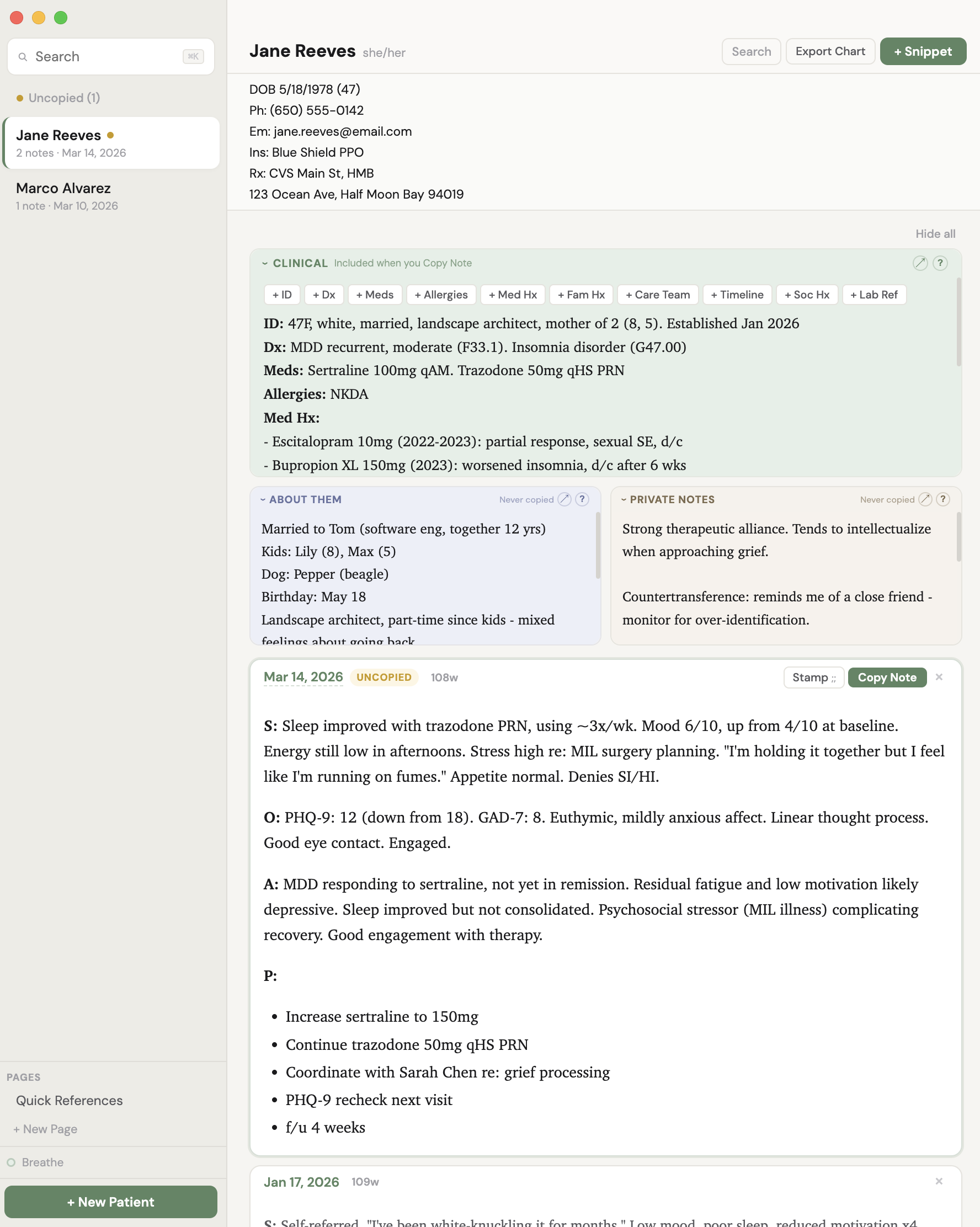 Image 2 of 3
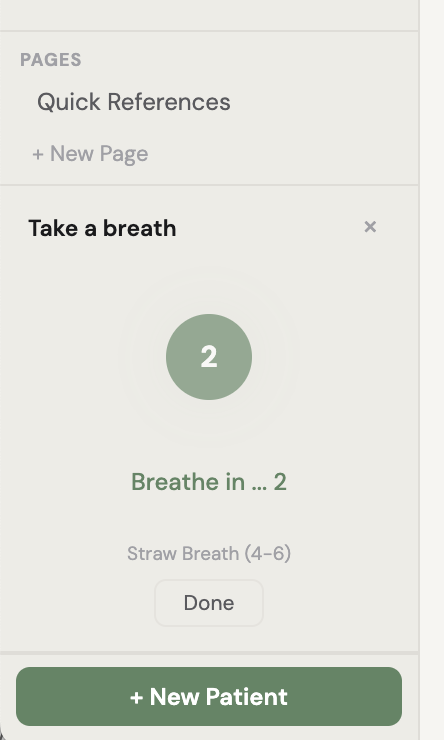 Image 3 of 3
Chartside - Apple Notes for Clinicians
What is Chartside?
Chartside is a local desktop app for mental health clinicians who are tired of charting in an EMR that fights them at every step.
It’s not for everyone. It’s for mental health clinicians who don’t love inputting into their EMR.
It’s a text editor. It separates stagnant clinical carryover from what happened today.
It’s also a viewer and visual noise reducer. It helps you search back to see only the unique info for each date you saw someone, not all the fluff (that you might still want in your final note, or have to have for insurance or legal purposes).
It sits next to your video call - a quiet, calm, always-open screen where you can see everything you need about a patient, write your note, and copy it to your EMR when you're done.
It's not an EMR. It's more secure than Apple Notes and less clunky than Word.
It's the thing next to the EMR that makes the EMR more bearable.
It also reminds you to breathe with a visual follow-along animation guide.
Why it exists
Rage. Note bloat, overcomplicated systems, and the growing realization that notes usually have two components: close-to-perennial carryover, and what's actually relevant today. The two usually get mixed. Sometimes we need to do that. And it usually takes wading through vast seas of note bloat to tell them apart.
To see a patient's last note in my EMR, I have to open a browser, log in, navigate to the patient, click into their chart, open an individual note, and then read it in formatting that's all bold bright blue with no visual hierarchy or formatting tools (not that I want to get in the weeds with them but, sometimes a little bold/non-bold action?).
Maybe you have to drag yourself through multiple buttons just to get through a "note"? And they all feel like such separate entities and out-of-sight out-of-mind (wait, what did that last one say?).
If I want to reference their med list while writing today's note, that's more clicking (and I feel like I’m in a totally different place). If I want to jot down that their cat's name is David or that they're thinking about a career change - do insurance companies or lawyers really need that? No, they really don’t. And there's nowhere to put it and see it easily - even if some EMR’s offer hidden “sticky notes” that float around…somewhere?
My dream: One place per patient. Search by last name. Click and type. Fast, simple. Everything visible.
But Apple Notes syncs to iCloud. Patient data in the cloud means you need a Business Associate Agreement with Apple, encryption in transit, access controls on every synced device. For a solo practitioner, that compliance burden kills the simplicity that made Apple Notes attractive in the first place and makes it unsafe for patient data most importantly.
Word is just too clunky, and I was not about to create and search for a separate Word doc for each person.
So I built the app I actually wanted: Everything Apple Notes does well - click-to-edit, one-place visibility, instant search, no "save" buttons, no "edit" mode - but designed specifically for clinical work, running locally on your Mac, with your data never leaving your machine.
How it works
Search for a patient. See everything. Write what’s relevant for just today. Copy into EMR. Next patient.
The copy takes up: clinical carryover (ID statement, med list, abbreviated med hx, fam hx) + today’s snippet + stamps (phrases you can edit for billing).
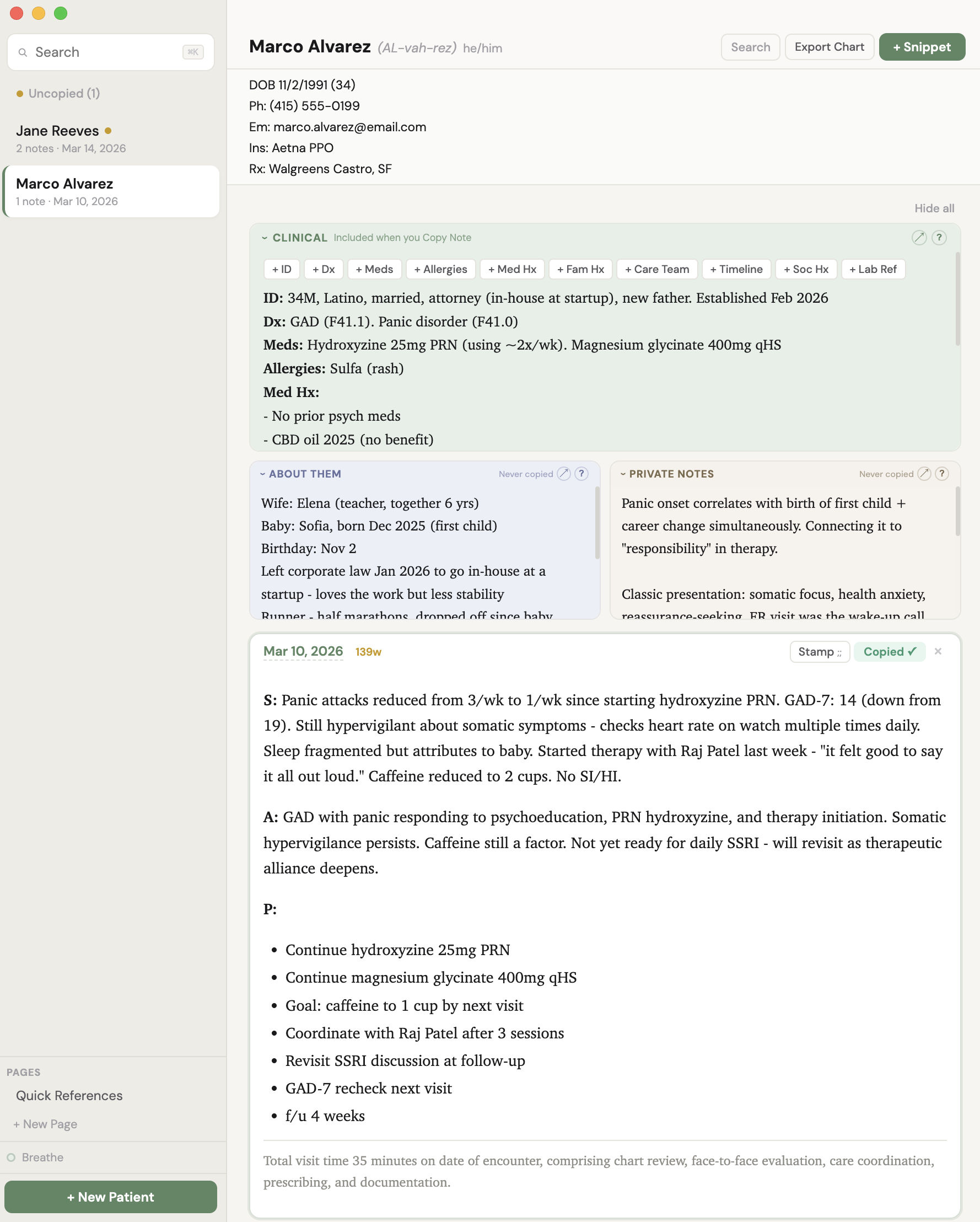
When you select a patient, you see their entire world in one view:
Quick Reference at the top - DOB (with auto-aging so you always know they're "36 until May 2026"), phone, email, insurance, pharmacy. Always visible. Free-text, so you paste it however you want it to look and whatever you want to include for quick reference. It's just for your eyes during the visit or when you need the info fast.
Three information layers, all visible at once, each always editable:
Clinical (green) - This is mostly stable carryover. Fully editable. Dx, meds, med timeline, allergies, care team, med history, family history, lab reference. Whatever you want. This is your persistent clinical snapshot. It carries across visits and copies with your note when you hit "Copy Note." Scaffold buttons (+ Dx, + Meds, + Allergies, + Care Team, etc.) help you build it out without starting from a blank page.
About Them (blue) - Spouse's name and how long they've been together. Kids' names and ages. Pet's name. Birthday. Job title. Hobbies. That they're getting married in June. That their sister lives in Portland. The human details that make you a good clinician but don't belong in a medical chart. "Copy Note" copies Clinical + Snippets only. Never About Them, never Private Notes.
Private Notes (beige) - Anything else. Truly. Links you want to share next time. Session dynamics. Countertransference observations. Hypotheses you're holding. Things they mentioned in passing that you want to follow up on. Patterns you're noticing. This is your private clinical thinking - the stuff that traditionally lives in your head or on a Post-it. Stored separately from the medical record, which is exactly what HIPAA requires for psychotherapy notes to receive their extra legal protections. A built-in info panel explains exactly what's protected and what the exceptions are, with California-specific law included. "Copy Note" copies Clinical + Snippets only. Never About Them, never Private Notes.
Below those layers: visit snippets. Each snippet is just the relevant info for that day - lean, focused, just what happened today. It should be short. Very short. Because your carryover info (dx, meds, allergies) lives in the Clinical layer and is always visible, there's no reason to copy it into every note. The bloat cycle breaks here. Well, at least visually.
The features
Carryover + Snippets architecture. Most EMRs let you "copy last note," which creates the doom spiral: a 2-paragraph note becomes 4 pages of carried-forward cruft by visit 8. Nobody reads it. Nobody trims it. Chartside separates what's persistent (carryover) from what's new (today's snippet). When you hit "Copy Note," both combine on your clipboard, ready to paste. Your carryover stays current. Your snippets stay lean.
Always editable. Inspired by Apple Notes. No "edit" button, no "done" button, no mode switching. Click anywhere and type. Everything persists automatically. This sounds small but it removes a surprising amount of friction from every interaction.
CYA Stamps. One-click documentation stamps for billing (99213 through 90837), risk assessments (suicide screen low/moderate, safety plan, violence risk, PHQ-9, GAD-7, C-SSRS), informed consent (new med, med change, off-label, med reconciliation, RBA), and care coordination (therapist, PCP, records reviewed, follow-up with safety). Click in and edit. A "Recent" section surfaces your most-used stamps at the top. Type ;; in any snippet for keyboard-quick access.
Uncopied / Copied status. Every snippet shows whether it's been copied to clipboard or not. (To reduce redundancy, your EMR will tell you which notes are missing or in draft.) The sidebar highlights patients with uncopied snippets so your end-of-day workflow is: click "Uncopied," see who still needs their note filed, finish and copy, done.
Search across everything. Search the whole thing. Or search within a patient's page - clinical info, about them, private notes, and all visit snippets. Find every mention of a medication, a symptom, a name. Click a result to jump to that snippet.
Export All. Copies a patient's complete record (all layers, all snippets) to your clipboard as clean text. If you need it all in one click.
Copy from Last Snippet. When you create a new snippet, you can start from the last one and edit forward. For clinicians who like the copy-forward workflow but want the anti-bloat guardrails.
SOAP and Blank templates. New snippets start from a SOAP template or free form.
Clinical scaffolds. When building out a new patient's clinical carryover, clickable buttons (+ Dx, + Meds, + Allergies, + Med Hx, + Fam Hx, + Care Team, + Timeline, + Soc Hx, + Lab Ref) insert bold headers so you don't start from a blank page. These are generally useful starting points. A guide explains what typically goes under each heading.
Word count on every snippet. Not as a scold - as a mirror. 47 words feels good. 312 words makes you think "do I need all this?" Note bloat becomes visible, which is the first step to fixing it.
Built-in breathing exercises. A small "Breathe" button in the sidebar opens two guided breathing patterns: Straw Breath (inhale 4s, exhale 6s through pursed lips) and Box Breathing (4-4-4-4). A gentle animated bubble expands and contracts smoothly over the full breath duration - follow it in your peripheral vision while you chart, or give it your full attention. Because your nervous system matters too, and this is supposed to be a calm place.
Floating formatting toolbar. Select any text and a dark formatting bar appears right above your selection (like Notion). Bold, italic, underline, bullets, indent, outdent. No cluttered toolbar taking up space.
What it's not
Chartside is not an EMR. It doesn't file claims, manage scheduling, handle prescriptions, or store your official medical record. Your EMR does all of that. Chartside is where you think, write, organize, and reference visually - and then copy your finished work into the EMR.
Chartside is not cloud-based. Your data lives on your Mac and nowhere else. No servers, no sync, no accounts. This is a feature, not a limitation. It means no BAAs with third parties, no encryption-in-transit complexity, no risk of a cloud breach exposing your patients' data. It’s basically Word, without having to open a separate file per person.
Chartside is not AI-powered (though it plays well with AI). It's a clean, fast, local writing tool. If you use an AI note-taker, paste its output into a snippet and edit.
HIPAA compliance
Chartside runs entirely on your Mac. No data is transmitted, stored in the cloud, or accessible to any third party. With FileVault enabled (your Mac's built-in disk encryption), a strong login password, and auto-lock set to 5 minutes, you've met HIPAA's core technical safeguards. A HIPAA Quick-Start Guide is included with your download, covering the Mac settings you need, the brief written documentation HIPAA requires, and how Chartside's architecture handles psychotherapy note protections.
The About Them and Private Notes sections are architecturally separated from clinical documentation, meeting HIPAA's requirement for psychotherapy notes to receive extra legal protections. The guide includes California-specific law and guidance for looking up your own state's protections.
What's included
Chartside desktop application for Mac
HIPAA Quick-Start Setup Guide
Stamp Library (billing, risk, consent, coordination)
Clinical scaffold templates
Breathing exercises (Straw Breath, Box Breathing)
What is Chartside?
Chartside is a local desktop app for mental health clinicians who are tired of charting in an EMR that fights them at every step.
It’s not for everyone. It’s for mental health clinicians who don’t love inputting into their EMR.
It’s a text editor. It separates stagnant clinical carryover from what happened today.
It’s also a viewer and visual noise reducer. It helps you search back to see only the unique info for each date you saw someone, not all the fluff (that you might still want in your final note, or have to have for insurance or legal purposes).
It sits next to your video call - a quiet, calm, always-open screen where you can see everything you need about a patient, write your note, and copy it to your EMR when you're done.
It's not an EMR. It's more secure than Apple Notes and less clunky than Word.
It's the thing next to the EMR that makes the EMR more bearable.
It also reminds you to breathe with a visual follow-along animation guide.
Why it exists
Rage. Note bloat, overcomplicated systems, and the growing realization that notes usually have two components: close-to-perennial carryover, and what's actually relevant today. The two usually get mixed. Sometimes we need to do that. And it usually takes wading through vast seas of note bloat to tell them apart.
To see a patient's last note in my EMR, I have to open a browser, log in, navigate to the patient, click into their chart, open an individual note, and then read it in formatting that's all bold bright blue with no visual hierarchy or formatting tools (not that I want to get in the weeds with them but, sometimes a little bold/non-bold action?).
Maybe you have to drag yourself through multiple buttons just to get through a "note"? And they all feel like such separate entities and out-of-sight out-of-mind (wait, what did that last one say?).
If I want to reference their med list while writing today's note, that's more clicking (and I feel like I’m in a totally different place). If I want to jot down that their cat's name is David or that they're thinking about a career change - do insurance companies or lawyers really need that? No, they really don’t. And there's nowhere to put it and see it easily - even if some EMR’s offer hidden “sticky notes” that float around…somewhere?
My dream: One place per patient. Search by last name. Click and type. Fast, simple. Everything visible.
But Apple Notes syncs to iCloud. Patient data in the cloud means you need a Business Associate Agreement with Apple, encryption in transit, access controls on every synced device. For a solo practitioner, that compliance burden kills the simplicity that made Apple Notes attractive in the first place and makes it unsafe for patient data most importantly.
Word is just too clunky, and I was not about to create and search for a separate Word doc for each person.
So I built the app I actually wanted: Everything Apple Notes does well - click-to-edit, one-place visibility, instant search, no "save" buttons, no "edit" mode - but designed specifically for clinical work, running locally on your Mac, with your data never leaving your machine.
How it works
Search for a patient. See everything. Write what’s relevant for just today. Copy into EMR. Next patient.
The copy takes up: clinical carryover (ID statement, med list, abbreviated med hx, fam hx) + today’s snippet + stamps (phrases you can edit for billing).
When you select a patient, you see their entire world in one view:
Quick Reference at the top - DOB (with auto-aging so you always know they're "36 until May 2026"), phone, email, insurance, pharmacy. Always visible. Free-text, so you paste it however you want it to look and whatever you want to include for quick reference. It's just for your eyes during the visit or when you need the info fast.
Three information layers, all visible at once, each always editable:
Clinical (green) - This is mostly stable carryover. Fully editable. Dx, meds, med timeline, allergies, care team, med history, family history, lab reference. Whatever you want. This is your persistent clinical snapshot. It carries across visits and copies with your note when you hit "Copy Note." Scaffold buttons (+ Dx, + Meds, + Allergies, + Care Team, etc.) help you build it out without starting from a blank page.
About Them (blue) - Spouse's name and how long they've been together. Kids' names and ages. Pet's name. Birthday. Job title. Hobbies. That they're getting married in June. That their sister lives in Portland. The human details that make you a good clinician but don't belong in a medical chart. "Copy Note" copies Clinical + Snippets only. Never About Them, never Private Notes.
Private Notes (beige) - Anything else. Truly. Links you want to share next time. Session dynamics. Countertransference observations. Hypotheses you're holding. Things they mentioned in passing that you want to follow up on. Patterns you're noticing. This is your private clinical thinking - the stuff that traditionally lives in your head or on a Post-it. Stored separately from the medical record, which is exactly what HIPAA requires for psychotherapy notes to receive their extra legal protections. A built-in info panel explains exactly what's protected and what the exceptions are, with California-specific law included. "Copy Note" copies Clinical + Snippets only. Never About Them, never Private Notes.
Below those layers: visit snippets. Each snippet is just the relevant info for that day - lean, focused, just what happened today. It should be short. Very short. Because your carryover info (dx, meds, allergies) lives in the Clinical layer and is always visible, there's no reason to copy it into every note. The bloat cycle breaks here. Well, at least visually.
The features
Carryover + Snippets architecture. Most EMRs let you "copy last note," which creates the doom spiral: a 2-paragraph note becomes 4 pages of carried-forward cruft by visit 8. Nobody reads it. Nobody trims it. Chartside separates what's persistent (carryover) from what's new (today's snippet). When you hit "Copy Note," both combine on your clipboard, ready to paste. Your carryover stays current. Your snippets stay lean.
Always editable. Inspired by Apple Notes. No "edit" button, no "done" button, no mode switching. Click anywhere and type. Everything persists automatically. This sounds small but it removes a surprising amount of friction from every interaction.
CYA Stamps. One-click documentation stamps for billing (99213 through 90837), risk assessments (suicide screen low/moderate, safety plan, violence risk, PHQ-9, GAD-7, C-SSRS), informed consent (new med, med change, off-label, med reconciliation, RBA), and care coordination (therapist, PCP, records reviewed, follow-up with safety). Click in and edit. A "Recent" section surfaces your most-used stamps at the top. Type ;; in any snippet for keyboard-quick access.
Uncopied / Copied status. Every snippet shows whether it's been copied to clipboard or not. (To reduce redundancy, your EMR will tell you which notes are missing or in draft.) The sidebar highlights patients with uncopied snippets so your end-of-day workflow is: click "Uncopied," see who still needs their note filed, finish and copy, done.
Search across everything. Search the whole thing. Or search within a patient's page - clinical info, about them, private notes, and all visit snippets. Find every mention of a medication, a symptom, a name. Click a result to jump to that snippet.
Export All. Copies a patient's complete record (all layers, all snippets) to your clipboard as clean text. If you need it all in one click.
Copy from Last Snippet. When you create a new snippet, you can start from the last one and edit forward. For clinicians who like the copy-forward workflow but want the anti-bloat guardrails.
SOAP and Blank templates. New snippets start from a SOAP template or free form.
Clinical scaffolds. When building out a new patient's clinical carryover, clickable buttons (+ Dx, + Meds, + Allergies, + Med Hx, + Fam Hx, + Care Team, + Timeline, + Soc Hx, + Lab Ref) insert bold headers so you don't start from a blank page. These are generally useful starting points. A guide explains what typically goes under each heading.
Word count on every snippet. Not as a scold - as a mirror. 47 words feels good. 312 words makes you think "do I need all this?" Note bloat becomes visible, which is the first step to fixing it.
Built-in breathing exercises. A small "Breathe" button in the sidebar opens two guided breathing patterns: Straw Breath (inhale 4s, exhale 6s through pursed lips) and Box Breathing (4-4-4-4). A gentle animated bubble expands and contracts smoothly over the full breath duration - follow it in your peripheral vision while you chart, or give it your full attention. Because your nervous system matters too, and this is supposed to be a calm place.
Floating formatting toolbar. Select any text and a dark formatting bar appears right above your selection (like Notion). Bold, italic, underline, bullets, indent, outdent. No cluttered toolbar taking up space.
What it's not
Chartside is not an EMR. It doesn't file claims, manage scheduling, handle prescriptions, or store your official medical record. Your EMR does all of that. Chartside is where you think, write, organize, and reference visually - and then copy your finished work into the EMR.
Chartside is not cloud-based. Your data lives on your Mac and nowhere else. No servers, no sync, no accounts. This is a feature, not a limitation. It means no BAAs with third parties, no encryption-in-transit complexity, no risk of a cloud breach exposing your patients' data. It’s basically Word, without having to open a separate file per person.
Chartside is not AI-powered (though it plays well with AI). It's a clean, fast, local writing tool. If you use an AI note-taker, paste its output into a snippet and edit.
HIPAA compliance
Chartside runs entirely on your Mac. No data is transmitted, stored in the cloud, or accessible to any third party. With FileVault enabled (your Mac's built-in disk encryption), a strong login password, and auto-lock set to 5 minutes, you've met HIPAA's core technical safeguards. A HIPAA Quick-Start Guide is included with your download, covering the Mac settings you need, the brief written documentation HIPAA requires, and how Chartside's architecture handles psychotherapy note protections.
The About Them and Private Notes sections are architecturally separated from clinical documentation, meeting HIPAA's requirement for psychotherapy notes to receive extra legal protections. The guide includes California-specific law and guidance for looking up your own state's protections.
What's included
Chartside desktop application for Mac
HIPAA Quick-Start Setup Guide
Stamp Library (billing, risk, consent, coordination)
Clinical scaffold templates
Breathing exercises (Straw Breath, Box Breathing)